Marketing operations
How to Choose Your AI Marketing Employee’s First Job
Choose a useful first task for your AI marketing employee, write a clear brief, and test the work before making it a recurring responsibility.
I’d start with one recurring, draft-only job, such as turning approved notes into one LinkedIn draft. Choose work you can check against supplied sources, and name the person who’ll review it before use.
Here’s how I’d set it up:
Choose the task: Check the judgment it needs, the harm an error could cause, whether you can verify the output, and how often it repeats.
Write the brief: Name the output, schedule, approved sources, example, reviewer, and done criteria.
Set permissions: Keep publishing, outreach, pricing, and promises under human control. Require a pause when key information is missing.
Test before repeating: Use approved past material, track review time and errors, revise the brief, and retest.
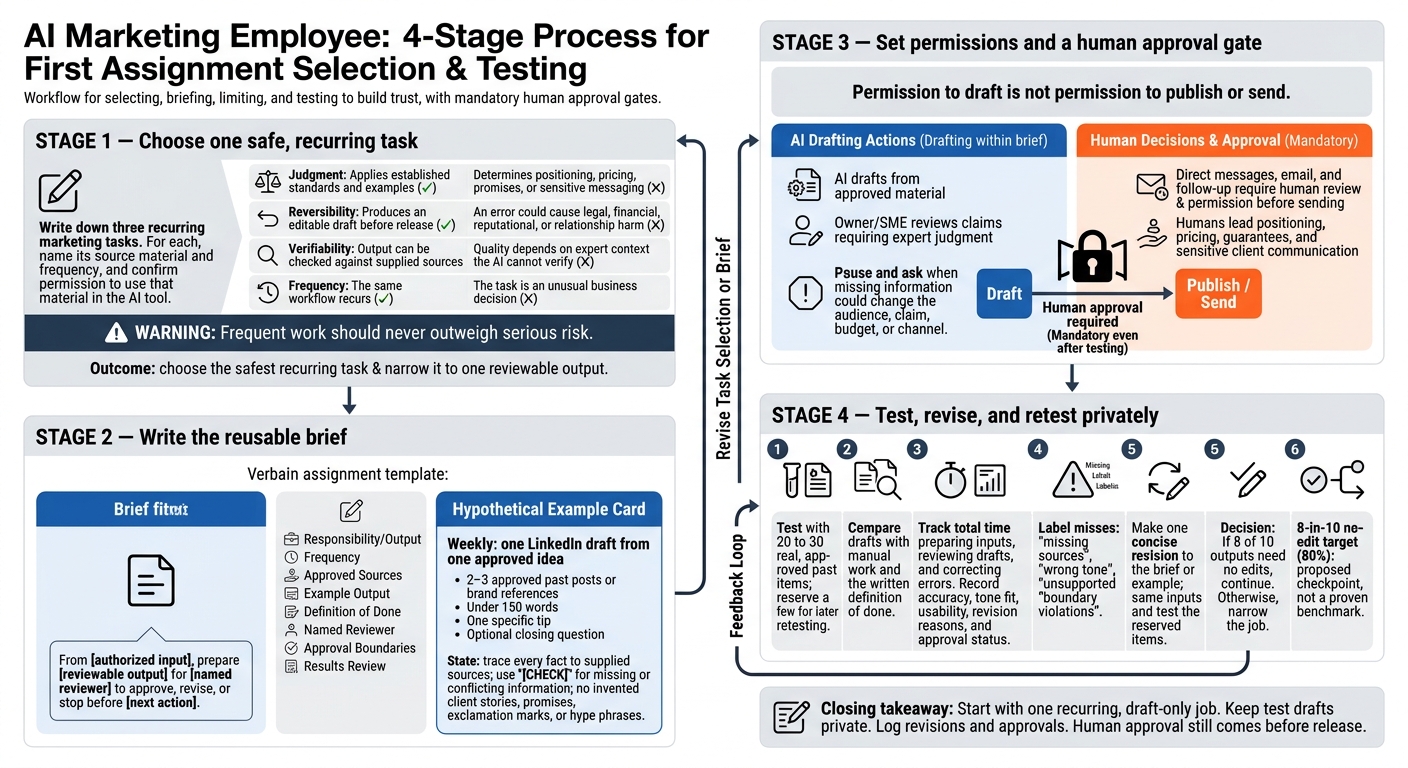
Choose and Test Your AI Marketing Employee’s First Job
Choose a Job With Clear Inputs and Low Risk
Write down three recurring marketing tasks you could safely delegate. Name the source material and frequency for each. Use work your business already does, such as turning subject notes into an outline or drafting a newsletter roundup from approved links. Then assess each task with the tests below.
Check Judgment, Risk, Sources, and Frequency
Mark each task favorable or unfavorable for each test. Add a short reason:
For example: “I can check this against approved notes.”
Frequent work should never outweigh serious risk. Check that you have permission to use the source material in your AI tool.
Test | Favorable first-job signal | Keep human-led if |
|---|---|---|
Judgment | Applies established standards and examples | Determines positioning, pricing, promises, or sensitive messaging |
Reversibility | Produces an editable draft before release | An error could cause legal, financial, reputational, or relationship harm |
Verifiability | Output can be checked against supplied sources | Quality depends on expert context the AI cannot verify |
Frequency | The same workflow recurs | The task is an unusual business decision |
Choose the safest recurring task, then narrow it to one output you can review.
Choose One Output for Owner Review
Pick one deliverable: an outline, a social post draft, or organized follow-up notes. Define it clearly enough to complete this sentence:
“From [authorized input], prepare [reviewable output] for [named reviewer] to approve, revise, or stop before [next action].”
Permission to draft is not permission to publish or send.
Hypothetical Example: A Consultant’s LinkedIn Draft
Hypothetical assignment: Each week, prepare one LinkedIn draft from a consultant-approved idea. For this draft, the idea is “why a discovery call should diagnose before it recommends.” Supply 2 to 3 approved past posts or brand references. Request a hook, a short explanation, and an optional closing question - not new promises or invented client stories. The consultant checks the advice, tone, and factual claims before revising, approving, or discarding it. Flag missing support; do not publish automatically.
Write Your First-Job Brief
Put the chosen job in one reusable brief so your team can repeat the task and review the work.
Set the Task, Schedule, Sources, and Example
Use the same fields for every assignment.
Responsibility: Prepare one LinkedIn draft from one approved idea for the owner to review.
Frequency: Weekly, after the owner provides the idea and notes.
Source material: Include the idea, expertise notes, official service description, accepted posts, and prohibited phrases list. Use the service description for service details and accepted posts for voice. Mark missing or conflicting information with [CHECK] instead of filling gaps.
Example output: Attach one approved post draft that shows the structure, tone, and formatting you want.
Define Done, Permissions, and Results Review
Definition of done: Keep the draft under 150 words, with one specific tip and an optional closing question. Don’t use exclamation marks or hype phrases. Trace every fact to the source material and flag unresolved questions.
Approval boundaries: Draft only. Don’t publish or send messages. Don’t invent client examples, make promises, or decide positioning or pricing. The owner makes those decisions.
Results review: After each draft, record accuracy, tone fit, usability, revision reasons, and approval status. Name specific problems rather than recording vague impressions. If the owner later publishes the post, log actual responses separately without attributing them to the draft.
Keep drafting separate from publishing.
Keep Drafting Separate From Publishing and Outreach
Keep the first job draft-only, using the brief’s approval boundaries. The AI employee drafts from approved material; the owner controls release. Publishing and outreach each need separate approval. This limited scope makes the job easier to teach.
State What Requires Human Approval
Set permissions that separate drafting from release, rather than relying on habit.
Activity | Treatment |
|---|---|
Drafting from approved material | The AI employee may prepare material within the brief |
Fact-checking and expert interpretation | The owner or subject-matter expert reviews claims that need subject-matter judgment |
Publication | A human must approve publication separately before release |
Direct messages, email, and follow-up | A human must review and give permission before sending |
Positioning, pricing, guarantees, and sensitive client communication | A human leads these decisions |
Even a polished draft needs human judgment when it includes confidential client context, expert-level claims, or sensitive client communication.
Add a pause-and-ask rule: the AI employee must pause when missing information could change the audience, claim, budget, or channel. If you later add publishing to the workflow, check write access, sending rights, final approval, timing, destination accuracy, and failure handling separately.
Test the Job Before Continuing
Once you’ve written the brief, test it on real inputs before making the job recurring.
Check repeatability: the job should produce usable drafts from approved sources across repeated runs without new instructions.
Test Real Inputs and Revise the Brief Once
For a larger recurring workflow, you could test the brief with 20 to 30 real, approved past items. Use a smaller trial when the task is simpler. Set a few aside for a later retest. Compare the drafts with your manual work and written definition of done. Track the total time you spend preparing inputs, reviewing drafts, and correcting errors.
Label each miss as missing sources, wrong tone, unsupported claims, or boundary violations. Use those results to make one concise revision to the brief or example. Then rerun the same inputs and test the reserved items. An example checkpoint is eight of ten outputs needing no edits. Choose a threshold appropriate to your task and risk; it is not a validated industry benchmark. Keep human approval before release, and narrow the job when results fall short.
Private-Review Checklist and Next Step
Before continuing, check that the brief names one recognizable output, a recurring schedule, approved sources, clear done criteria, and explicit approval boundaries. Confirm that revisions and approvals are logged. Keep test drafts private and log the review outcome.
Pick one recurring task, write the first-job brief, and test it before adding another responsibility.
FAQs
What if I don’t have approved marketing examples?
Before you delegate to an AI employee, create one checked example. Document your process, service details, audience notes, and project facts. Use those notes to write and review one strong piece of content yourself, then make it the starting point for your first AI task.
This gives your AI employee a clear source of truth to work from and helps reduce generic wording and factual errors.
How do I know if AI drafting saves me time?
Measure total effort, not just drafting speed. Record how long the full manual workflow takes, from gathering information to the final edit.
Run a one-week side-by-side test. Track time spent on AI setup, instructions, verification, and corrections, then compare the full workflow totals. If the AI workflow takes as long or longer, adjust the process or reconsider which work you delegate. Use net time saved per cycle as your measure.
When should I add a second AI responsibility?
Add a second AI responsibility once the first task has demonstrated reliable results across repeated runs. Reliable social posts don’t mean your AI employee is ready to write newsletter intros.
If the new job needs instructions or output rules that conflict with the first task, create a separate, focused setup. Before adding another tool, define where the new task starts, where it ends, and what an acceptable result looks like. Close any workflow gaps before handing over more work.
Prepared with SEObot and edited for CubiCrew.